
Go to Windows platform Display platforms icon
Go to Windows platform Go to Mac platform Go to Android platform Go to iOS platform
FilmCraft icon

FilmCraft

0.17.1
5 1 reviews
3.3 k downloads
security security

Professional video editing that's accessible to everyone

Advertisement
Remove ads and more with Turbo
Advertisement
Remove ads and more with Turbo
Andrés López icon
Reviewed by
Andrés López
Content Editor
Andrés López is part of Uptodown's in-house Editorial Team. Translated by Uptodown Localization Team

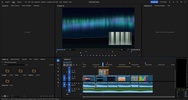
FilmCraft is an open-source video editing software that was built entirely in Rust with artificial intelligence tools. This program basically offers a completely free reimplementation of Adobe Premiere that retains its workspace, keyboard shortcuts, features, and interface design.

Lightweight and easy to use

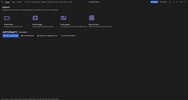
The first thing you'll notice when you go to use FilmCraft for the first time is that it takes up around 80 MB on your hard drive. By contrast, Adobe Premiere takes up around 8 GB depending on the version you're using. That is to say, ArtCraft's software manages to offer a very similar experience while taking up approximately 100 times less space. And the best part? This program doesn't require installation, and you'll even be able to use it without an Internet connection.

Advertisement
Remove ads and more with Turbo

A familiar video editor

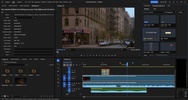
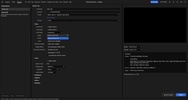
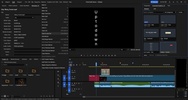
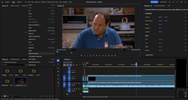
Anyone who has ever used Adobe Premiere will instantly understand how each and every feature of FilmCraft works. This program not only has the exact same features, but it also has a practically identical interface. You will be able to work with a timeline that feels familiar and add as many tracks as you want with ease. Thanks to this, you will be able to start editing your movies like a pro right from the start.

My experience with FilmCraft

It has been more than 20 years since I first used Adobe Premiere and, although I've tried many other video editing tools since then, my muscle memory still recognizes the interface and keyboard shortcuts of the Adobe software. That's why, with FilmCraft, I was able to start editing my videos practically instantly. All the tools, features, and panels were exactly where I remembered. And in the end, that's the most important thing when you want to edit a video quickly.

The best and worst of FilmCraft

• What I like most about FilmCraft is that the program feels like Adobe Premiere on every level, but it's completely free. Additionally, you can import projects and timelines from many other video editing apps, including Final Cut Pro, OpenTimeline, and CMX.

• What I like least about FilmCraft is that the app almost seems too good to be true. Fortunately, I haven't encountered any errors or bugs yet.

A well-rounded video editing tool

Download FilmCraft to discover an excellent video editor that's not only free and open source, but also offline, packed with features, and easy to use. An amazing alternative for anyone who wants to edit videos professionally on their PC.

FilmCraft is for you if

✓ You want professional Premiere-style video editing without subscriptions, heavy installs, or licensing constraints
✓ You rely on a familiar Premiere-like interface and shortcuts to start editing efficiently immediately
✓ You value a lightweight, offline, portable editor that imports timelines from popular video apps

Information about FilmCraft 0.17.1

Basic information

Developer ArtCraft
Category Video Editors
Rating All ages
Languages English
47 more

Distribution model

Pricing Free
License Apache 2.0
Notice
Copyright © 2026 ArtCraft
Why is this app published on Uptodown? (More information)

Security and privacy

Required permissions Not applicable
See security and antivirus report

Download info

Downloads 3,252
Date Nov 6, 2026
File type ZIP
Size 103.97 MB
SHA256 6a87da6b1bbf3251a6995626f8de42388c6255e10f434a893034774b4a5a6766
Advertisement
Remove ads and more with Turbo

Older versions

See more
zip 0.16.0 Nov 2, 2026
zip 0.14.0 Oct 30, 2026
zip 0.12.0 Oct 23, 2026
msi 0.10.0 Oct 21, 2026
msi 0.7.2 Oct 14, 2026
msi 0.2.1 Oct 7, 2026
Available for other platforms

Rate this App

Review the app
FilmCraft icon

Rating

5.0
5
4
3
2
1
1 reviews

Comments

There are no opinions about FilmCraft yet. Be the first! Comment

Advertisement
Remove ads and more with Turbo
CapCut icon
Incredibly powerful and easy-to-use video editor
Adobe Premiere Pro icon
Video editing for professionals and beginners
Adobe After Effects icon
The most advanced video-editing tool from Adobe
Wondershare Filmora icon
Create and edit impressive videos in the easiest way possible
Adobe Photoshop Express icon
Advanced photo-editing from this free program
VN: Video Editor icon
Edit Like a Pro. Without Limits.
Topaz Video AI icon
Edit your videos with the help of AI
EffectCraft icon
Video editing with motion graphics, effects, keyframes, and more
VLC Media Player icon
A powerful media player and streaming server
Rufus icon
Create boot disks from an external drive
DLSS 5 Swapper icon
Install and manage DLSS 5 in games and emulators
Proton VPN icon
Powerful, free, secure and unlimited VPN
Telegram Desktop icon
Talk to all your Telegram contacts from the desktop
SolidCraft icon
Design parametric 3D parts with an editable history on your PC
Craft Anything icon
Analyze any software or website and build your own version on your PC
CubicAdventurer icon
CubicAdventurer is a highly-configurable tabbed file manager
CapCut icon
Incredibly powerful and easy-to-use video editor
HEVC Video Extensions from Device Manufacturer icon
Play HEVC (H.265) encoded videos on Windows
VLC Media Player icon
A powerful media player and streaming server
Adobe Premiere Pro icon
Video editing for professionals and beginners
Adobe After Effects icon
The most advanced video-editing tool from Adobe
FormatFactory icon
Conversion between video, sound and image formats
Media Player Classic - Home Cinema (MPC-HC) icon
An all-round great multimedia player
Wondershare Filmora icon
Create and edit impressive videos in the easiest way possible